This feature is currently in a gradual rollout and is available for all clients from the EU, who are yet to begin the onboarding of their entity.
The Management and ownership section of the Compliance center lists every person and company that owns or controls your entity. Payhawk needs this list to confirm who stands behind the business before it can approve your application.
The list covers everyone who owns or controls the entity, including owners that Payhawk finds by tracing through corporate shareholders.
Payhawk fills in this list for you from the official business registry. When it is done, a note above the list shows how many people and companies Payhawk found and how many of them still need information from you.
When your ownership structure includes other companies, such as a parent or holding company, the list is grouped by company. Your entity comes first, followed by the other companies in the structure. A person who holds roles in more than one company appears under each of them.
Each person or company in the list shows what is still missing, for example Missing: Date of birth, Politically exposed person status.

The Payhawk Compliance team can add more people after reviewing your application. When a corporate document reveals another owner in the chain, that person appears in the list with the status Action needed.
Adding a person or a company to the application
Some details may already be filled in from the official business registry or from documents that you uploaded. Values that Payhawk read from your documents are marked with a sparkle icon. Review and correct them if needed.
To add a person or a company:
In the Payhawk Web Portal, go to Settings > Compliance center.
Under Management and ownership, click on the + Add person or company button and select:
An individual, which is a natural person acting as an owner, a director, or an authorized representative. You can choose from the following three roles:
Director is a person appointed to manage the entity.
Shareholder is a person or company that holds a stake in the entity. The list shows the ownership percentage next to the role.
Authorized representative is a person allowed to act for the entity, for example, to sign the application.
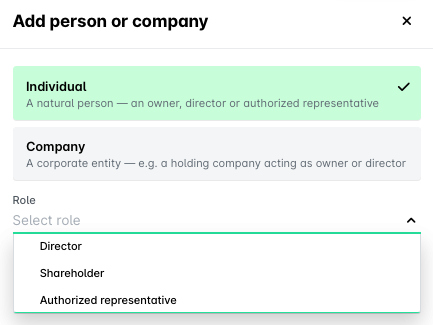
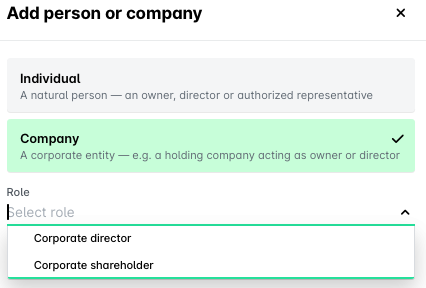
A company, which is a corporate entity acting as an owner or a director, such as a holding company. You can choose from the following two roles:
Corporate director is a company appointed to manage the entity, instead of an individual. Payhawk verifies the people who direct that company.
Corporate shareholder is a company that holds a stake in the entity, such as a parent or holding company. Payhawk traces the ownership through it to the people who ultimately own or control the group.
Click on Add.
Required details for directors and shareholders
For each director or shareholder, under the Management and ownership section, you need to provide the following details:
First name.
Last name.
Date of birth.
Citizenship(s) (if a person has more than one citizenship, add all of them).
Country of residence.
Political exposure: whether, in the last 12 months, they have been a politically exposed person (PEP), a family member of a PEP, or a close associate of a PEP. You choose one of three options: This person is a politically exposed person (PEP), This person is a relative or close associate of a PEP, or Neither applies. A politically exposed person holds a prominent public role, for example a high-ranking government official, a politician, or the head of a state-owned enterprise.

Required details for authorized representatives
For each authorized representative under the Management and ownership section, you need to provide the following details:
First name.
Last name.
Email address.
Country of residence.
When you choose an authorized representative to sign the application, the Sign-off section asks for the rest of their details, including the Power of Attorney document. For more information, see signing off and submitting your application.
Required details for corporate directors and corporate shareholders
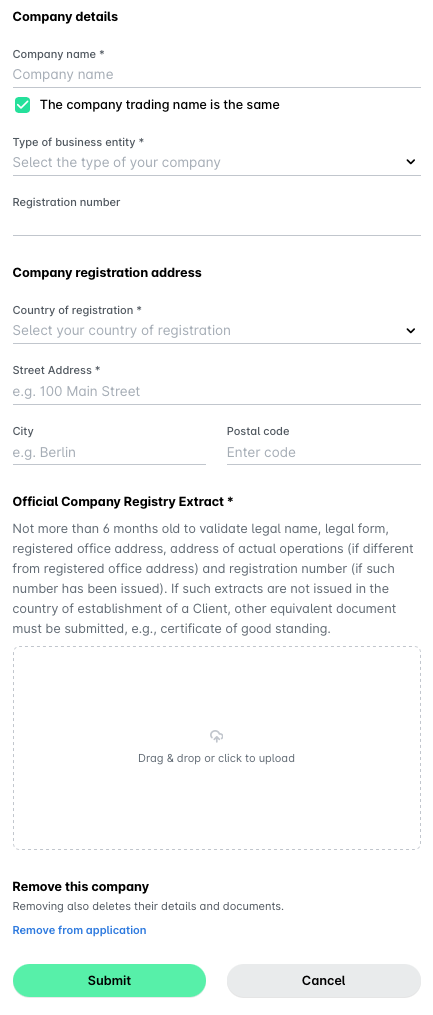
For each corporate director or corporate shareholder, under the Management and ownership section, you need to provide the following details:
Company name.
Type of business entity, for example, Limited Liability Company.
Registration number.
Company registration address, including country of registration, street address, city, and postal code.
Official company registry extract document.
Removing a person from the application
To remove a person from the application:
In the Payhawk Web Portal, go to Settings > Compliance center.
Under Management and ownership, open the desired person by clicking on their name in the list.
In the dialog that opens, click on Remove this person.
Removing a person also deletes their details and any documents they provided, so check the list before you confirm. You can add the person again later, but their details won't come back.
Click on Remove to confirm.

You can't remove a person or a company that Payhawk found in the official business registry, or a role that the Payhawk Compliance team has already accepted. Instead of the remove option, they show the I cannot provide this link. Click on it to see how to contact the Payhawk Compliance team at compliance@payhawk.com.