Error message
Failed to export expense. Exact Online requires both the Amortization start and end fields to be either empty or populated.Affected ERP integrations
Exact Online
Cause
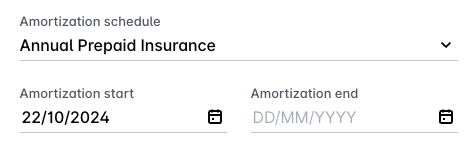
This error occurs when an expense in Payhawk uses an amortization schedule, but only one of the two required date fields, Amortization Start or Amortization End, has been filled in. Exact Online enforces a strict validation rule that requires both the start and end dates to be either both populated or both left empty. A partially filled amortization schedule will be rejected and will cause the export to fail.
Solution
To resolve this issue:
In the Payhawk Web Portal, go to Expenses and open the expense that failed to export by clicking on it.
Navigate to the Amortization Schedule section of the expense.
Review the Amortization Start and Amortization End date fields:
If the expense requires amortization, ensure that both the start and end dates are filled in with valid dates that reflect the correct amortization period.
If the expense does not require amortisation, clear both the start and end date fields and leave them both empty.
Save the updated expense.
Attempt to export the expense again.