Error message
Failed to create bank statement. Statement ID number sequence is not configured. Go to Cash and bank management parameters > Number sequences and configure it.Affected ERP integrations
Microsoft Dynamics 365 Finance and Operations
Cause
This error occurs when Microsoft Dynamics 365 Finance and Operations is not configured with a number sequence for Bank statement or Statement ID. When Payhawk attempts to export a bank statement, Microsoft Dynamics 365 Finance requires a predefined number sequence to assign unique IDs to these statements. If this configuration is missing, Microsoft Dynamics 365 Finance cannot process the bank statement, and the export fails.
Solution
To resolve this issue:
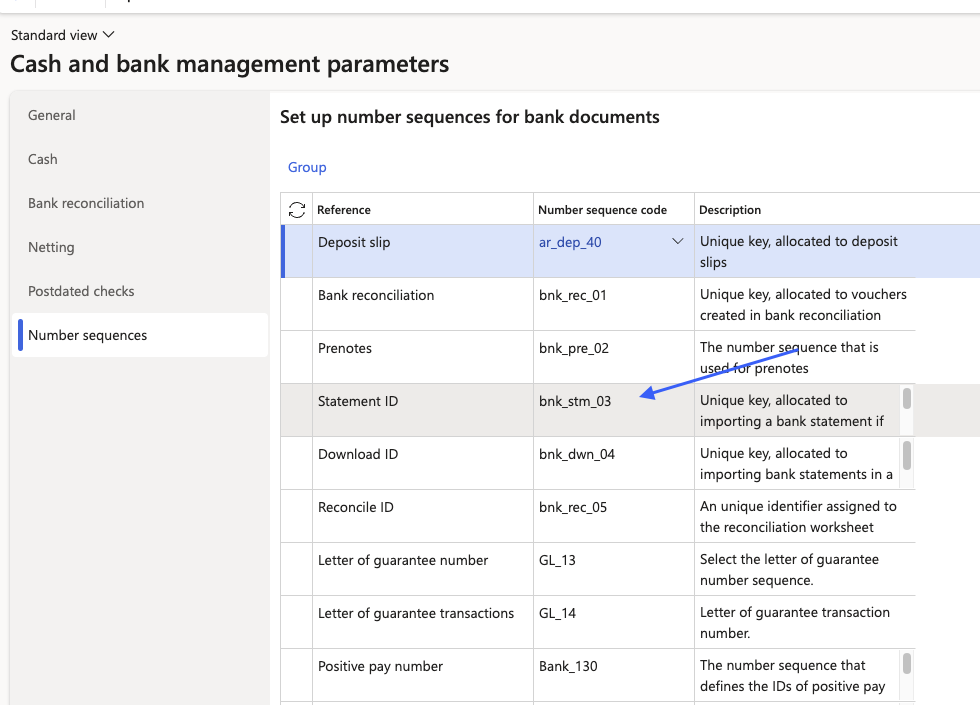
In Microsoft Dynamics 365 Finance, go to Cash and bank management > Setup > Cash and bank management parameters.
Click on the Number sequences tab.
Scroll through the grid to find the reference named Bank statement or Statement ID.
Check the Number sequence code column for that row:
If it is blank, select a valid number sequence code from the drop-down.
If there are no options in the drop-down, you first need to create a new number sequence before you can assign it here.
Return to Payhawk and attempt to export the bank statement again.