Error message
The expense category mapped to the G/L account in Oracle NetSuite has 'Rate Required' enabled. Please disable this setting or select another expense category.Affected ERP integrations
Oracle NetSuite
Cause
This error occurs when the expense category in Oracle NetSuite that is mapped to a G/L account in Payhawk has the Rate Required setting enabled. Payhawk currently does not support this setting, and when it is active, Oracle NetSuite requires a rate to be explicitly provided for the expense category during export, which Payhawk is unable to supply. As a result, the export fails.
Solution
To resolve this issue:
Log in to your Oracle NetSuite account.
Navigate to Expense categories.
Locate the expense category that is mapped to the G/L account used in your Payhawk expense.
Open the expense category and find the Rate Required setting.
Disable the Rate Required option.
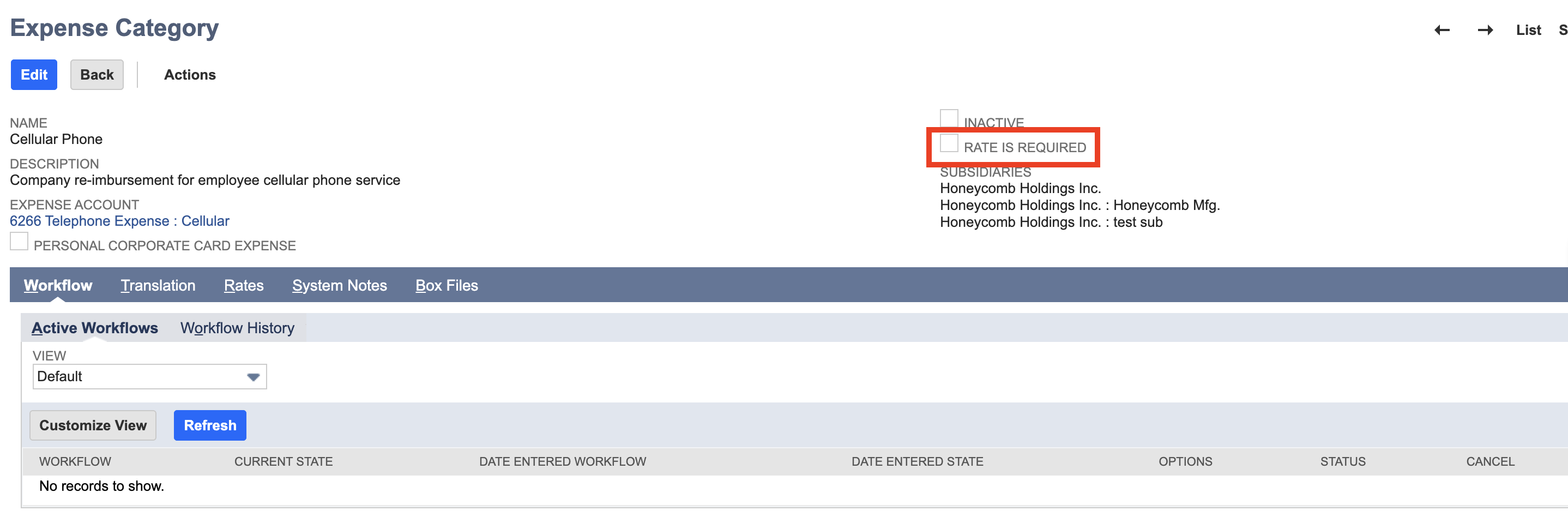
Save the changes.
Return to Payhawk and attempt to export the expense again.